How Developers Can Build AI-Ready Web Applications in 2026 (Without Overengineering)

The pressure to build "AI-powered" applications is everywhere in 2026. Every startup pitch deck mentions AI. Every SaaS product promises intelligent features. But here's what most developers are getting wrong: you don't need to build an AI-powered app right now. You need to build an AI-ready one.
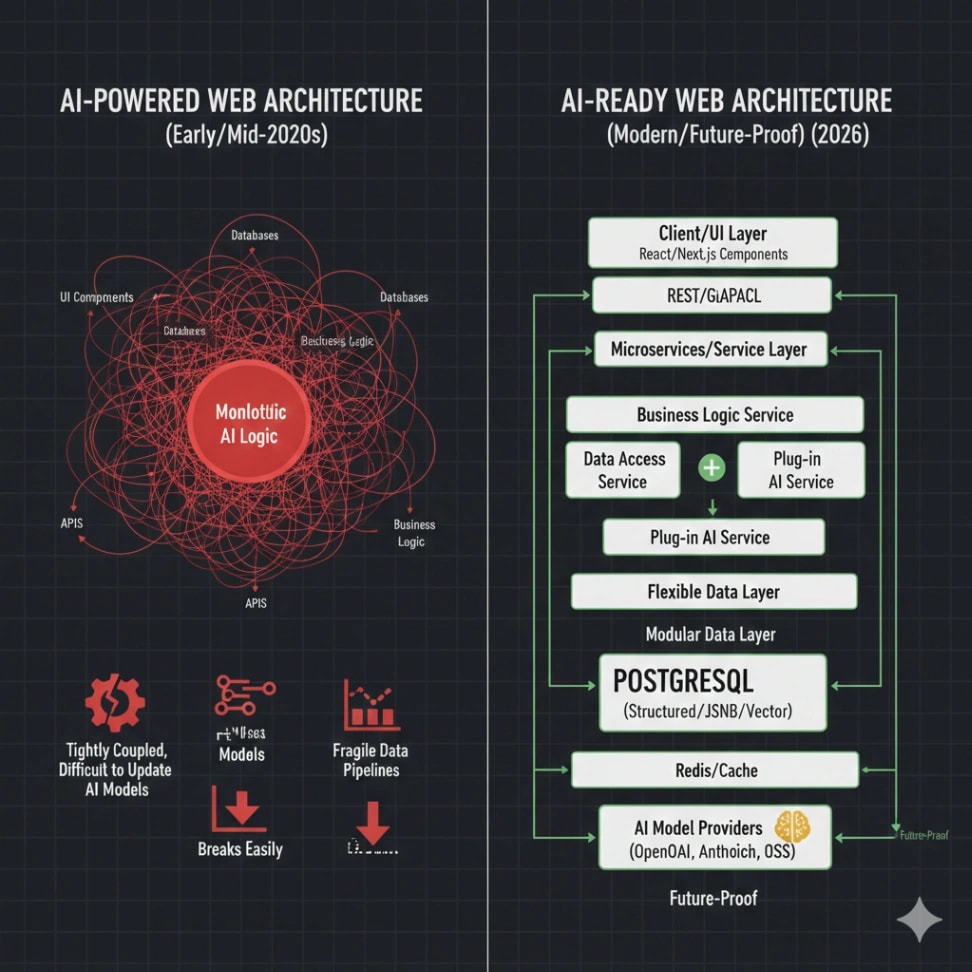
There's a crucial difference. AI-powered apps force AI features into the product immediately, often leading to overengineered solutions that break when AI models change or when your requirements evolve. AI-ready apps, on the other hand, are built with clean, flexible architectures that let you integrate AI capabilities naturally when the time is right—without rewriting your entire codebase.
This guide will show you how to build modern, future-proof web architecture that's ready for AI integration without the complexity trap. Whether you're building a SaaS platform, an e-commerce site, or an internal dashboard, these principles will help you stay flexible, maintainable, and genuinely prepared for whatever comes next.

What Does "AI-Ready" Actually Mean?
Let's cut through the buzzwords. An AI-ready web application is simply one that's built with these characteristics:
Clean separation of concerns. Your business logic isn't tangled up with your UI or database queries. When you need to add an AI feature like content generation or smart recommendations, you can plug it in without touching unrelated code.
Flexible data architecture. Your database and APIs can handle unstructured data, streaming responses, and asynchronous operations—all common patterns when working with AI models.
API-first design. Your frontend talks to your backend through well-defined APIs, making it easy to insert AI services as middleware or separate microservices later.
Modular frontend components. Your UI can adapt to new interaction patterns like streaming text, dynamic content updates, and conversational interfaces without a complete redesign.
The goal isn't to predict every AI feature you might build. It's to avoid painting yourself into architectural corners that make integration painful down the road.
Frontend Architecture: Build for Flexibility
Your frontend in 2026 should be component-based, reactive, and ready to handle dynamic content. Here's what matters:
Choose Modern Frameworks Wisely
React, Vue, and Svelte are all solid choices for AI-ready applications. What matters more than the framework is how you structure your code. Use component composition, avoid prop drilling, and embrace modern state management.
For full-stack development in 2026, Next.js and similar meta-frameworks have become the standard. They give you server-side rendering, API routes, and excellent developer experience out of the box. But remember: the framework is just a tool. Focus on writing clean, testable components first.
Tip: Structure your components to accept data from any source. If a component expects a list of products, it shouldn't care whether those products came from your database, a cache, or an AI-generated recommendation engine. This single decision will save you countless hours when you start integrating AI features.
Design for Streaming and Real-Time Updates
AI models often stream responses token by token rather than returning everything at once. Your UI needs to handle this gracefully.
Build components that can update progressively. Use React Suspense for loading states. Implement optimistic UI updates. Get comfortable with Server-Sent Events or WebSockets for real-time data.
Here's a practical example: If you're building a content editor, structure it so text can appear gradually rather than all at once. This same component will work perfectly when you later add AI writing assistance.
Tip: Create a reusable streaming text component early in your project. Even if you're displaying static content today, this component will be invaluable when you integrate AI text generation later.
Keep State Management Simple
Don't overcomplicate state management. For most applications, React Context or Vue's Composition API is enough. Add Zustand or similar lightweight libraries when you need global state.
The key is keeping state predictable and traceable. When AI features enter the picture, you'll often need to track loading states, error conditions, and partial results. Clean state management makes this straightforward.
Backend Architecture: API-First and Flexible
Your backend architecture determines how easily you can integrate AI capabilities. Here's how to build it right:
Design Clean API Boundaries
Every feature in your application should be accessible through a well-designed API endpoint. This isn't just good practice—it's essential for AI-ready architecture.
When you structure your APIs correctly, adding AI features becomes a matter of inserting new middleware or creating parallel endpoints. For example, if you have a clean API for user content, you can easily add a new endpoint that passes that content through an AI summarization service.
Use RESTful conventions for CRUD operations, but don't be afraid to create specialized endpoints for complex operations. A /api/posts/generate-summary endpoint is perfectly fine if it makes your code clearer.
Tip: Version your APIs from day one. Use /api/v1/ prefixes. When you add AI features that change response formats or require different parameters, you can introduce v2 endpoints without breaking existing clients.
Build for Async Operations
AI operations often take seconds rather than milliseconds. Your backend needs to handle long-running tasks gracefully.
Implement job queues using tools like BullMQ or Celery. Design endpoints that return immediately with a job ID, then let clients poll for results or use webhooks for completion notifications.

This pattern works for AI and non-AI features alike. Whether you're processing a large file upload, generating a PDF report, or calling an AI model, the architecture is the same.
Tip: Create a standard response format for async operations. Something like { jobId, status, result?, error? } gives clients a consistent interface for all long-running tasks.
Choose the Right Backend Stack
In 2026, Node.js with TypeScript, Python with FastAPI, and Go are all excellent choices for scalable web applications. Python has an edge for AI integration due to the ecosystem, but any modern language can call AI APIs effectively.
What matters more is your architecture. Use dependency injection. Write testable code. Keep your business logic separate from your framework code. These principles make any stack AI-ready.
Database Design: Flexible and Scalable
Your database decisions have long-term implications. Here's how to design for both current needs and future AI features:
PostgreSQL as Your Foundation
PostgreSQL remains the gold standard for modern SaaS architecture in 2026. It handles structured data beautifully, but also supports JSONB for unstructured data, full-text search, and vector operations through extensions.
This flexibility is perfect for AI-ready applications. You can store traditional relational data for your core features, JSON blobs for AI-generated content or metadata, and even vector embeddings for semantic search—all in one database.
Tip: Add a metadata JSONB column to tables that might interact with AI features. This gives you a flexible place to store AI-generated tags, scores, or insights without schema migrations.
Plan for Unstructured Data
AI often produces or requires unstructured data. User conversations, generated content, and embeddings don't fit neatly into traditional schemas.
Design your database to handle both worlds. Use relational tables for core business entities, but don't force everything into rigid schemas. A hybrid approach with JSONB columns or document stores for certain use cases gives you the flexibility you need.
For applications dealing with large amounts of AI-generated content or conversational data, consider adding MongoDB or a similar document database alongside PostgreSQL. The key is using the right tool for each type of data.
Consider Vector Capabilities Early
If there's any chance you'll build search, recommendations, or similarity features, think about vector storage now. You don't need to implement it immediately, but choose a database that supports it.
PostgreSQL with pgvector extension is a great starting point. Pinecone or Weaviate are alternatives if you need dedicated vector search. The important thing is not locking yourself into a solution that makes semantic search impossible later.
Tip: Even if you're not using vectors today, add a vector column to tables where you might want semantic search later (like posts, products, or documents). It's easier to populate vectors incrementally than to add the capability through a major migration.
API Strategy: Design for Integration
Your API layer is where AI features will plug in most naturally. Design it with integration in mind:
Create Abstraction Layers
Don't call external services directly from your controllers or route handlers. Create service layers that abstract the implementation details.
For example, if you have an email sending feature, create an EmailService class rather than calling SendGrid directly everywhere. Later, when you want to add AI-powered email personalization, you modify the service without touching dozens of controller files.
This same pattern works for any feature that might benefit from AI: content generation, image processing, data analysis, or personalization.
Tip: For any feature that processes or generates content, create a service interface now. Even if the initial implementation is simple, this abstraction makes AI integration straightforward later.
Implement Proper Error Handling
AI services can fail in unpredictable ways. Models get rate limited. APIs time out. Responses come back malformed. Your error handling needs to be robust.
Implement retry logic with exponential backoff. Return meaningful error messages to clients. Log failures for debugging. These practices benefit all external integrations, not just AI.
Build fallback mechanisms. If an AI recommendation service is down, your app should still work—maybe showing standard recommendations instead. Graceful degradation keeps your application reliable.
Document Everything
Good API documentation is crucial for AI-ready applications. Tools like OpenAPI (Swagger) make your endpoints discoverable and testable.
When you eventually integrate AI services, clear documentation helps you understand how to pass data between systems. It also makes it easier to use AI coding assistants effectively—they work better when they can reference your API specifications.
Performance and Scalability Considerations
AI features can be resource-intensive. Build your application to handle varying loads:
Implement Caching Strategically
Caching is essential for scalable web applications, and it's even more important when AI is involved. AI API calls are often expensive and slow. Aggressive caching of results can dramatically reduce costs.
Use Redis for session data, frequently accessed content, and AI-generated results that don't need to be regenerated often. Implement cache invalidation strategies that work for your use case.
Tip: Cache AI-generated content with longer TTLs than dynamic data. If an AI writes a product description or generates a summary, that result might be valid for hours or days, not seconds.
Design for Horizontal Scaling
Your application should scale by adding more servers, not by making existing servers bigger. This means stateless services, externalized session management, and load balancer-friendly architecture.
This approach works perfectly for AI integration. You can scale your AI-processing services independently from your core application services. Heavy AI workloads don't affect your application's responsiveness.
Use containerization with Docker and orchestration with Kubernetes if your scale demands it. But for most applications, serverless platforms or managed container services provide enough flexibility without operational complexity.
Monitor Everything
Observability is critical for AI-ready applications. Implement logging, metrics, and tracing from the start.
Track API response times, error rates, and resource usage. When you add AI features, you'll want to monitor their performance and costs separately. Having monitoring infrastructure in place makes this easy.
Tools like Sentry for error tracking, Datadog for metrics, or even simpler solutions like Vercel Analytics can give you the insights you need.
Real-World Examples: Putting It Together
Let's look at how these principles work in practice:
Example 1: Content Management SaaS
Imagine you're building a blog platform. Today, users write and publish posts. Tomorrow, you might want to add AI features like auto-generated summaries, SEO suggestions, or content improvement recommendations.
AI-ready architecture:
Store posts in PostgreSQL with JSONB metadata column
Create a
ContentServicethat handles all post operationsBuild a component library with streaming text support
Design APIs with
/api/posts/:id/summaryendpoint structure readyImplement caching for generated summaries
When you're ready to add AI, you update the ContentService to call an AI API, create the summary endpoint, and connect it to your existing UI components. Most of your application remains untouched.
Example 2: E-Commerce Platform
You're building an online store. Future AI features might include personalized recommendations, dynamic pricing, or automated product descriptions.
AI-ready architecture:
Use PostgreSQL for products, orders, and users
Add vector column to products table for future semantic search
Create a
RecommendationServicethat returns products (initially based on simple rules)Build flexible product card components that work with any data source
Design APIs that support filtering, sorting, and pagination
When you add AI recommendations, you swap the implementation in RecommendationService and potentially add vector search. Your UI and most backend logic stay the same.
Example 3: Internal Dashboard Application
You're building an analytics dashboard for your startup. Eventually, you want AI to answer natural language questions about your data.
AI-ready architecture:
Create a clean data access layer that abstracts database queries
Build chart components that accept data in standard formats
Design APIs that return consistent data structures
Implement WebSocket support for real-time updates
Store query history in a way that can be used for training or context
When you add conversational AI, you create a new service that translates questions to queries using your existing data access layer. The results flow through your existing API structure to your existing components.
Common Pitfalls to Avoid
As you build AI-ready web applications, watch out for these mistakes:
Don't prematurely optimize for AI. You don't need to integrate vector databases or set up GPU servers if you're not using them. Build clean architecture first, add AI capabilities when you need them.
Avoid vendor lock-in. Use abstraction layers when calling external AI services. If you're using OpenAI today, make sure you could switch to Anthropic or a self-hosted model tomorrow without rewriting your entire application.
Don't sacrifice simplicity. The goal is readiness, not complexity. A well-structured monolith is better than a poorly designed microservices architecture. Add complexity only when you have clear benefits.
Remember that not everything needs AI. Sometimes traditional algorithms, rules, or simple data queries work better than AI. Build applications that solve user problems, not applications that showcase technology.
Tools and Technologies for 2026

Here's a quick reference for building future-proof web architecture in 2026:
Frontend: Next.js, Remix, or SvelteKit for meta-frameworks. React, Vue, or Svelte for UI libraries. TailwindCSS for styling.
Backend: Node.js with TypeScript, Python with FastAPI, or Go for performance. Express or Fastify for Node.js frameworks.
Database: PostgreSQL for primary data store. Redis for caching. Consider MongoDB for document storage if needed.
Deployment: Vercel, Netlify, or Railway for quick deployment. AWS, Google Cloud, or Azure for enterprise scale.
Monitoring: Sentry for errors, Vercel Analytics or Plausible for usage, Datadog or Grafana for custom metrics.
AI Integration (when ready): Vercel AI SDK, LangChain, or direct API calls to OpenAI, Anthropic, or open-source models.
Conclusion: Build for Today, Prepare for Tomorrow
The secret to building AI-ready web applications in 2026 isn't about using every new tool or framework. It's about applying timeless principles of good software architecture: separation of concerns, clean abstractions, thoughtful data modeling, and maintainable code.
When you focus on these fundamentals, AI integration becomes a natural extension of your application rather than a painful rewrite. You can experiment with AI features quickly, iterate based on user feedback, and scale what works—all without the technical debt that comes from rushed implementations.
Start with clean architecture. Build features that solve real problems. Keep your code testable and maintainable. Design APIs that make sense. Structure your data thoughtfully.
Do these things well, and you won't just build an AI-ready application. You'll build an application that's ready for whatever comes next—whether that's AI, new device paradigms, or technologies we haven't imagined yet.
The future belongs to developers who build solid foundations, not to those who chase every trend. Build something that lasts, and you'll be ready for anything.
Now go build something great.